Automation Action
Quick Updates adds a custom action to monday.com’s workflow automations. Use it to automatically post templated updates when triggers fire — like when a status changes, an item is created, or a date arrives.
Setting Up an Automation
Section titled “Setting Up an Automation”- Go to your board’s Automations center
- Create a new automation with any trigger (e.g., “When Status changes to Done”)
- For the action, select Post [template name] as an update
- Choose a template from the dropdown
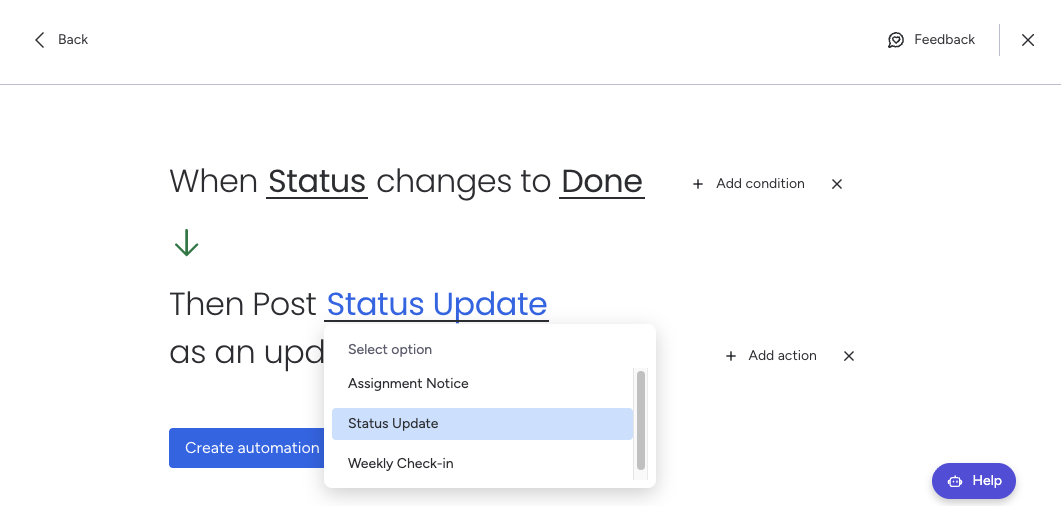
Each time the automation triggers, the selected template is posted as an update on the item, with variables resolved automatically.
How It Works
Section titled “How It Works”- The automation uses your team templates — personal templates are not available in automations
- Variables like
{item.name},{column.status}, and{today}are resolved at trigger time using the item’s current data - The update is posted on behalf of the app, not a specific user
Example Use Cases
Section titled “Example Use Cases”- Status changes to Done → Post a “Task Completed” summary with item details
- New item created → Post an onboarding checklist or welcome message
- Date arrives → Post a reminder or follow-up notification
- Person assigned → Post an assignment notice with context